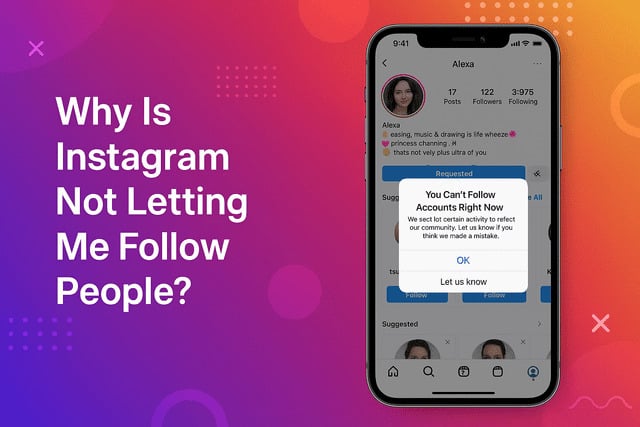
Instagram has several built in systems that monitor user activity, and when something looks unusual, the app may temporarily stop certain actions. One of the most common issues people experience is the inability to follow new accounts, which leads many users to ask Why Is Instagram Not Letting Me Follow People? Even if your account seems perfectly normal, Instagram might still place restrictions that prevent the follow button from working. Understanding why this happens is the first step toward fixing it.
Why Instagram Suddenly Won’t Let You Follow Anyone
Imagine you discover a new creator whose posts feel like they were made for you. You tap the Follow button and… nothing. The button either turns back to “Follow” or gives you a weird message.
This is one of the most common Instagram follow issues, and it usually comes down to how Instagram protects the platform from bots.
Instagram constantly monitors unusual behavior and uses Instagram spam detection to prevent automated accounts from taking over. When your activity looks even slightly suspicious, Instagram steps in.
You may see messages like Try again later Instagram, Action blocked Instagram error, or even We restrict certain activity Instagram. These alerts can make you feel like something is wrong with your account. Sometimes it is not your fault at all.
For example, app glitches can stop the follow button from working. In other cases, your activity triggers a temporary block. You are not banned forever. Instagram just wants to slow you down for a bit.
Many users who cannot follow new accounts also experience the Instagram try again later error, which often appears when Instagram temporarily slows down actions for security reasons:
You May Have Hit Instagram’s Daily or Hourly Follow Limit
Most people do not know there is an Instagram follow limit. Instagram never reveals the exact number, but many users hit what feels like a wall when following too aggressively.
This is why you might suddenly wonder Why can't I follow anyone on Instagram even though your account seems fine.
Instagram limits how many people you can follow within a short period. These limits help prevent Instagram automation flagged accounts from abusing the system. If you follow dozens of people within minutes or spend an hour mass following, the system might interpret your behavior as Instagram follow unfollow too fast. Once that happens, you get a temporary halt.
This temporary restriction is similar to a “cooldown period.” Instagram wants to see that you are a real human using the app normally. During this cooldown, you might struggle to follow anyone, even if your intentions are good.
If you want to grow your account during this time, it helps to focus on improving engagement. For example, many creators increase visibility when they choose to boost Instagram views using trusted tools.
Why Following Too Fast Triggers Instagram’s Action Block
If you have ever seen an Instagram action blocked message, it usually means the system thinks you are moving a little too fast. Instagram constantly looks for suspicious patterns like:
• Following new users within seconds
• Repeating the same action too often
• Interacting with accounts at high speed
These behaviors can activate Instagram suspicious activity warning or even a Instagram temporary block. This is especially common for new accounts.
Instagram does not know you well yet, so even innocent behavior may appear risky. Sometimes users who have recently changed devices experience a Instagram suspicious login activity alert, which tightens restrictions temporarily.
Once you have been slowed down by an action block, your follow button becomes almost useless. You can tap it all day, and nothing will happen.
The best fix is patience. Give the app some time to cool off. If you want to keep growing your audience while waiting, many creators focus on building credibility through authentic engagement or choosing to get real Instagram followers from sources that help maintain natural activity patterns.
Account Restrictions You Might Not Know About
Sometimes the inability to follow people comes from silent restrictions on your account. These can include:
• Instagram community guidelines violation
• Instagram account flagged for bot activity
• Instagram account temporarily restricted
• Instagram account blocked from following
• Instagram shadowban signs
You might not receive a clear message from Instagram every time. Some restrictions simply reduce what your account can do.
These issues usually appear after mass following, suspicious behavior patterns, or reports from other users. Occasional restrictions are normal and temporary, but repeated violations can lead to longer blocks.
If you are dealing with follow restrictions, you might also run into issues tagging users, and learning why you can’t tag someone on Instagram can help you understand Instagram’s broader activity limits:
App Bugs, Glitches, or Outdated Versions Causing Follow Issues
It is easy to blame yourself, but sometimes your account is completely fine. Instagram is a massive platform, and glitches happen more often than people imagine.
There are moments when a server outage makes the Instagram follow glitch spread across thousands of users at once. During these moments, the follow button fails even for totally normal accounts.
Other times the issue is caused by your app. Outdated versions lead to bugs like:
• Buttons not responding
• Pages not loading
• Delayed follow requests
A quick fix is to update the app, clear your cache, or reinstall it. Many users do not realize how often corrupted cache files create problems like Instagram follow button not working. Once you refresh the app, things usually return to normal.
When cleaning up your account and refreshing your activity, creators sometimes also work on engagement growth. This is often when they look into strategies to get more likes on Instagram to improve overall visibility.
Network or Login Problems That Can Stop the Follow Button From Working
Some follow issues have nothing to do with your behavior or Instagram’s rules. Instead, the problem might come from your connection or login status.
• Weak or unstable internet
• VPN interference
• Login sessions that expired
• Recent device switching
• Instagram login issues
• Instagram account security check
• Verify Instagram account identity
When your network is unstable, Instagram cannot complete your follow request. This leads to confusing errors, especially the Instagram follow error or the Instagram rate limit exceeded message.
Sometimes Instagram logs you out quietly in the background for security reasons and blocks certain actions until you sign in again.
In rare cases, you may also need to verify your identity. If Instagram detects odd behavior, it prevents risky actions. This often shows up as a temporary limitation that disappears once you complete the verification.
When You Should Contact Instagram Support
Most follow issues resolve themselves within a few hours or days. However, there are times when you should contact Instagram support. If you have tried everything and your account is still stuck, especially if you see messages like We limit how often you can do certain things Instagram, then it is worth reaching out.
You can use the “Report a problem” tool inside the app. This is helpful when you suspect a glitch or a deeper unseen restriction. Instagram might not respond instantly, but they do review reports, especially when the issue involves long-term Instagram account restrictions or a Instagram follow ban.
Before contacting support, double check your app version, network, cached data, and overall behavior. Slow down your actions and allow the system to reset. If the problem still exists for several days, reaching out is a smart next step.
Final Verdict
If you ever find yourself wondering again Why Is Instagram Not Letting Me Follow People?, you can feel confident knowing that the cause is almost always temporary. Instagram is designed to protect the community, so it blocks anything that appears automated or suspicious.
This includes fast following, mass interactions, guideline violations, or sudden activity changes. App glitches and connection issues can also create the illusion of a block even when nothing is wrong with your account.
Understanding these patterns helps you navigate the app more smoothly, avoid unnecessary restrictions, and keep your profile healthy. Instagram limits exist to maintain fair behavior across the platform, not to punish you.
Once you identify the cause of your restriction, you can adjust your activity, refresh your app, verify your identity, or wait out the temporary block. These issues may feel confusing, but they always have a logical explanation. If everything else fails, support is available to guide you through.
FAQs
Why is Instagram not letting me follow anyone even though I did nothing wrong?
This usually happens because of temporary restrictions triggered by fast actions, app glitches, or reaching your activity limit. Even normal behavior can look suspicious to Instagram’s automated system. Waiting a few hours or refreshing your app often solves the problem.
How to fix action blocked on Instagram quickly?
Start by slowing down your activity and taking a short break. Clear your cache, update the app, and make sure your internet connection is stable. Many users also log out and back in to reset the temporary block.
Why does Instagram say try again later when I follow people?
This message appears when the system thinks your activity might be excessive. It could also be caused by network issues or outdated app versions. The block usually resolves itself once Instagram confirms your actions are safe.
How long does a temporary block last on Instagram?
Most temporary restrictions last between a few hours and 48 hours. More serious blocks can last several days. These blocks fade once your activity returns to normal and the system stops detecting risky patterns.
Can my account get permanently banned from following people?
Permanent bans are extremely rare and usually linked to repeated policy violations or ongoing bot-like behavior. Most users experience only short-term blocks that disappear over time. Following responsibly prevents long-term restrictions.
Why does the follow button not work on Instagram?
A broken follow button is often caused by app glitches, corrupted cache data, or a poor internet connection. Restarting your phone or reinstalling the app often fixes it quickly. If the issue continues, your account might be under a temporary restriction.