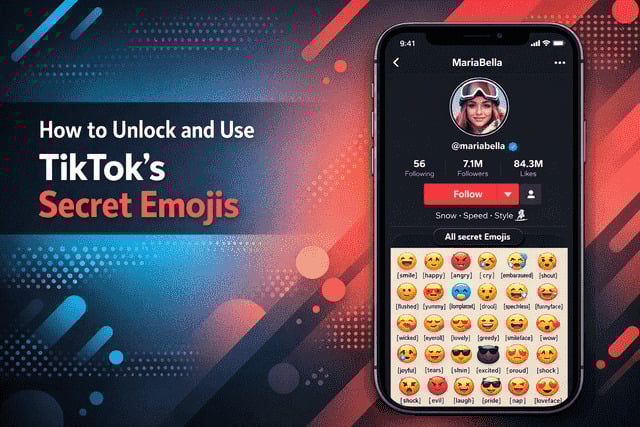
TikTok is full of surprises, and one of its most fun hidden features is its secret emoji system. If you have ever scrolled through comments and noticed emojis you cannot find on your keyboard, you are not imagining things. This guide on how to unlock and use TikTok’s secret emojis will walk you through how they work, why TikTok added them, and how you can start using them like a pro.
Unlike regular emojis, these icons are built directly into the platform and activated with special codes. Once you know the trick, unlocking them feels like discovering a hidden room in a game you already love.
What Are TikTok Secret Emojis?
TikTok secret emojis are exclusive symbols that only appear when you type specific emoji codes inside the app. These emojis are not part of your phone’s emoji keyboard, which is why many users do not even realize they exist.
These are often referred to as TikTok hidden emojis, and they function differently from standard Unicode emojis. Instead of tapping an icon, you type a word inside square brackets, and TikTok automatically converts it into a unique emoji.
For example, typing a code like [smile] triggers a TikTok-only emoji that looks different from what you would see on iOS or Android. These TikTok emojis not on keyboard are designed specifically for comments, captions, and sometimes direct messages.
Creators often use them to stand out visually, especially in comment sections where engagement matters.
Why TikTok Has Hidden Emojis in the First Place?
TikTok thrives on interaction. Comments, reactions, replies, and visual cues all play a role in how content spreads. Adding secret emojis gives users another creative tool to communicate emotion and personality without cluttering the interface.
These emojis are also part of TikTok’s larger ecosystem of TikTok hidden features that reward users who spend time learning the platform. By hiding emojis behind text commands, TikTok encourages exploration and insider knowledge.
Another reason is branding. TikTok wants its app to feel different from every other social platform. These custom emojis reinforce that identity and help explain why TikTok emojis look different compared to those on Instagram or Twitter.
From a creator’s perspective, these emojis also help comments pop visually, which can increase engagement signals and even help videos gain traction.
Full List of TikTok Secret Emoji Codes (Updated)
TikTok has a fixed set of emoji codes that work across the app, although availability may vary slightly depending on region or app version.
These are commonly known as TikTok secret emoji codes, and they follow a simple syntax. You type a word in square brackets with no spaces. TikTok secret emojis appear as colorful cartoon-style faces inside the app, but outside TikTok they show only as text codes.
Examples include:
- [smile]
- [happy]
- [cute]
- [laugh]
- [lovely]
- [cool]
- [proud]
- [excited]
- [angel]
- [loveface]
- [angry]
- [cry]
- [embarrassed]
- [surprised]
- [astonish]
- [awkward]
- [blink]
- [complacent]
- [disdain]
- [drool]
- [evil]
- [facewithrollingeyes]
- [flushed]
- [funnyface]
- [greedy]
- [joyful]
- [laughwithtears]
- [nap]
- [pride]
- [rage]
- [scream]
- [shock]
- [shout]
- [slap]
- [smileface]
- [speechless]
- [stun]
- [sulk]
- [tears]
- [thinking]
- [weep]
- [wicked]
- [wow]
- [wronged]
- [yummy]
- [confused]
- [hmm]
These are often called TikTok emoji cheat codes, and once you memorize a few, typing them becomes second nature. Many creators save them in their notes app for quick access.
Understanding How to type TikTok secret emojis correctly is crucial. The brackets must be standard square brackets, not parentheses or curly brackets. This structure is also referred to as TikTok emoji syntax, and even one typo will cause the emoji not to render.
If you are wondering How to activate TikTok emojis, there is no toggle or setting. They activate automatically when the correct code is typed inside the app.
What TikTok Secret Emojis Look Like?
TikTok’s secret emojis are cartoon-style icons that feel expressive and playful. They often resemble animated stickers rather than standard emojis.
Because they are platform-specific, many users ask Are TikTok emojis different from iPhone emojis, and the answer is yes. These emojis are rendered only within TikTok and do not carry over to other apps.
Visually, these TikTok app emojis tend to have exaggerated facial expressions. This makes them especially effective for reactions. You will often see them used as TikTok emoji reactions in comment threads where users respond emotionally rather than with words.
Creators also use them strategically in TikTok emojis in captions to add personality without distracting from the video itself. When placed correctly, they enhance tone rather than overpower it.
Why Secret Emojis Don’t Work for Some Users?
If you tried typing a code and nothing happened, you are not alone. There are several reasons why hidden emojis may not appear.
First, your app may be outdated. TikTok rolls out features gradually, and older versions may not support the full emoji set. This is often tied to a TikTok emoji update that has not reached all users yet.
Second, some regions have limited access. TikTok tests features in waves, so availability can differ by country.
Third, the emoji may not work in every area of the app. While How to use TikTok emojis in comments is well supported, usage in TikTok emojis in DMs can be inconsistent depending on updates.
If emojis still do not work, double-check spelling and brackets. These emojis rely on exact commands, sometimes called TikTok emoji commands, and even a missing letter will prevent them from appearing.
How to Use Hidden Emojis on TikTok Effectively?
Now that you know how they work, the real question is how to use them without overdoing it. The best approach is subtlety.
Hidden emojis work best when they enhance emotion rather than replace language. For example, adding one emoji at the end of a comment can make it feel more human and expressive.
They are especially powerful in replies, where TikTok comment emojis can help your response stand out in crowded threads. Another trick is using them in storytelling captions. One or two emojis placed naturally can guide emotion without distracting from your message.
Many creators also use them as part of TikTok emoji shortcuts saved in notes for faster posting.
TikTok Secret Emoji Meanings Explained
Each emoji has a specific emotional tone, which is why understanding context matters. This is where TikTok secret emoji meanings come into play.
For example, the [cry] emoji exaggerates sadness more than a standard crying emoji. The [angry] emoji often looks more cartoonish and playful than genuinely upset.
Users often search What do TikTok emojis mean because they notice these differences. TikTok intentionally designed them to be expressive rather than literal.
If you are confused by a symbol, think of it as TikTok emoji explained through tone rather than definition. They are reaction-based, not symbolic like traditional emojis.
This also answers How do TikTok hidden emojis work. They are visual reactions triggered by text commands, not universal characters.
If you enjoy experimenting with TikTok’s hidden features, you might also find it useful to read our article How to Comment with Pictures on TikTok, since combining visual comments with secret emojis can make your replies stand out even more.
Final Verdict
TikTok secret emojis are one of those small features that make a big difference once you understand them. They add personality, improve engagement, and help you communicate emotion in a way that feels native to the platform.
Learning how to unlock and use TikTok’s secret emojis gives you an edge, whether you are a casual user, a creator, or someone focused on growing visibility. They are easy to use, fun to experiment with, and surprisingly powerful when used correctly.
As TikTok continues evolving, these emojis remain a subtle reminder that the platform rewards curiosity, creativity, and users who take the time to learn its hidden layers.
FAQs
Does TikTok have secret emojis
Yes, TikTok has built-in emojis that only appear when you type specific text codes inside square brackets.
How to unlock TikTok secret emojis
You unlock them by typing the correct emoji code in comments, captions, or supported message areas within the app.
Why TikTok emojis look different
TikTok uses custom-designed emojis that are exclusive to the platform and not part of standard emoji libraries.
How to use hidden emojis on TikTok
Type the emoji code exactly as required, including brackets, and TikTok will automatically convert it into a secret emoji.
What do TikTok emoji symbols meaning depend on
Their meaning depends on emotional context, as they are designed to act as visual reactions rather than literal symbols.