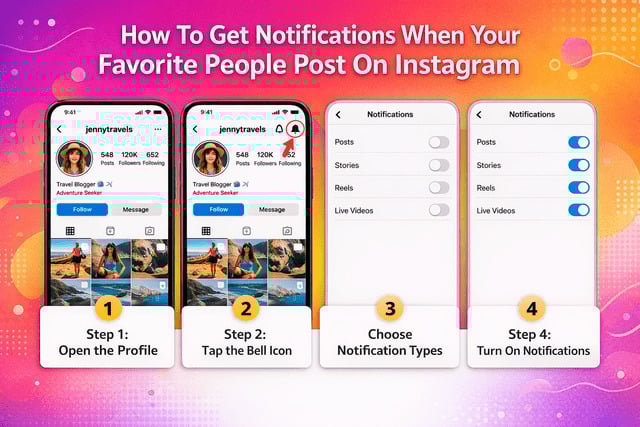
How To Get Notifications When Your Favorite People Post On Instagram is easier than most people realize. Instagram includes a built-in feature that lets you receive alerts every time specific accounts share new content.
Instead of constantly refreshing your feed or scrolling endlessly, you can enable notifications and get a push alert the moment someone posts a photo, story, reel, or goes live.
This is especially useful if you follow creators, friends, or brands whose updates you never want to miss.
Instagram’s notification system works like a personalized alert system that keeps you updated with the accounts that matter most.
Once you learn how to enable and customize these alerts, staying updated becomes effortless.
Quick Answer: How To Get Notifications When Someone Posts on Instagram
Follow these quick steps.
- Open the Instagram app
- Go to the profile of the person you want alerts from
- Tap the bell icon in the top right corner
- Choose which notifications you want
- Turn on alerts for Posts, Stories, Reels, or Live videos
Once enabled, Instagram sends a push notification whenever that person shares new content.
These alerts help you catch new posts instantly instead of relying on the algorithm to show them in your feed.
Many creators pay attention to early engagement signals, which is why some also work on strategies to increase likes on TikTok while expanding their social presence to strengthen visibility across platforms.
How Instagram Post Notifications Actually Work
Instagram notifications are designed to alert you when something important happens on the platform.
These alerts can include activity from:
- accounts you follow
- people interacting with your posts
- new followers
- messages
- mentions
When you activate notifications for a specific person, Instagram prioritizes their activity and sends alerts whenever they post new content.
The platform can notify you when someone publishes:
- a feed post
- a reel
- a story
- a live video
This feature is particularly helpful if you follow many accounts because posts can easily get buried in a busy feed.
Notifications act as a direct signal that something new has been posted.
Instead of searching manually, you receive an instant alert.
Step-by-Step Guide to Turn On Instagram Notifications for Someone
Enabling notifications is simple once you know where to look.
Start by opening Instagram and navigating to the account you want to follow more closely.
Step 1: Open the profile
- Launch Instagram
- Search for the user
- Tap their profile
Step 2: Tap the bell icon
At the top of the profile page you will see a bell icon.
Tap it to access notification settings for that account.
Step 3: Choose notification types
Instagram lets you toggle alerts for different types of content:
- posts
- reels
- stories
- live videos
Step 4: Turn on the notifications you want
Once enabled, the toggle becomes active and notifications will start arriving whenever new content is published.
Creators often monitor engagement closely, and tactics such as buying TikTok views through services like SocialBoosting are sometimes used alongside notification strategies to increase content exposure.
When Notifications Still Don’t Appear
If alerts are still not arriving after enabling them, try these quick fixes.
- restart your phone
- update the Instagram app
- disable Pause Notifications inside Instagram
- check background app restrictions
These small adjustments usually solve most notification issues.
Read more: Why Don't I Get Notifications From Instagram?
Types of Instagram Notifications You Can Enable
Instagram offers several types of notifications depending on how closely you want to follow someone.
Post Notifications
These alerts notify you when someone uploads:
- a photo
- a video
- a carousel post
Useful if you want to see new posts immediately.
Story Notifications
Story notifications alert you when someone shares a new story.
Stories disappear after 24 hours, so notifications help ensure you do not miss them.
Reels Notifications
Reels alerts notify you when someone publishes a short video.
These are helpful if you follow creators who frequently post reels.
Live Notifications
Live alerts notify you when someone starts a live broadcast.
Benefits include:
- joining live sessions instantly
- interacting through comments
- watching content in real time
Using the Instagram Favorites Feature
Instagram also offers a feature called Favorites, which prioritizes certain accounts in your feed.
Adding someone to your Favorites list means:
- their posts appear higher in your feed
- their stories are easier to find
- you see their content sooner
To add someone to Favorites:
- open their profile
- tap Following
- choose Add to Favorites
Favorites work well alongside notifications.
Notifications alert you when content is posted.
Favorites ensure their posts appear prominently in your feed.
Why You Might Not Receive Instagram Notifications
Sometimes notifications stop working even when they are enabled.
Common reasons include:
- phone notification permissions disabled
- Instagram notifications paused
- outdated app version
- restricted background activity
- internet connection issues
If notifications suddenly stop appearing, checking these settings usually resolves the issue.
How to Fix Instagram Notifications Not Working
If alerts are not arriving, try these quick fixes.
Check phone notification settings
- Open device settings
- Select Instagram
- Ensure notifications are enabled
Check Instagram notification settings
Inside the app:
- go to Settings and Privacy
- tap Notifications
- review post and story notification settings
Update the Instagram app
Updating the app can fix bugs related to notification delivery.
Restart or reinstall the app
If problems continue:
- restart the app
- reinstall Instagram
These steps typically restore normal notification behavior.
Privacy: Will Someone Know If You Turn Notifications On?
A common concern is whether Instagram tells users when someone enables notifications for their posts.
The answer is simple.
Instagram does not notify users when you turn notifications on or off.
This means you can follow someone’s updates closely without them knowing.
Notification settings are completely private.
Extra Tips to Never Miss Posts From Your Favorite Accounts
Besides enabling notifications, a few habits can help ensure you always see the content you care about.
Try these tips:
- interact regularly with their posts
- like and comment on their content
- save posts you enjoy
- enable multiple notification types
- add accounts to Favorites
Content creators often grow audiences across multiple platforms, and strategies like getting more TikTok followers while expanding reach through services such as are sometimes used alongside Instagram growth tactics.
Combining engagement with notifications helps you build a feed that prioritizes your favorite accounts.
Quick Checklist for Instagram Notifications
Use this checklist to confirm your settings.
✔ Bell icon enabled for specific profiles
✔ Post notifications turned on
✔ Story alerts enabled
✔ Reel notifications active
✔ Live notifications activated
✔ Device notifications allowed
✔ Favorites feature used for priority accounts
Following this checklist ensures you receive alerts whenever your favorite creators post new content.
Read more: Instagram Notifications Not Working 2026
Final Thoughts
Learning How To Get Notifications When Your Favorite People Post On Instagram makes it much easier to stay connected with the accounts you care about.
Instead of relying entirely on the algorithm, notifications bring important updates directly to you.
With just a few quick settings, you can receive alerts whenever your favorite creators share new posts, stories, reels, or live videos.
Once notifications and favorites are set up properly, your Instagram experience becomes far more personal and much easier to keep up with.
FAQ
How do you get notified when someone posts on Instagram?
Go to their profile, tap the bell icon, and enable notifications for posts, stories, reels, or live videos.
Can you turn on notifications for a specific person on Instagram?
Yes. Instagram allows you to activate alerts for individual accounts using the bell icon.
Does Instagram notify someone when you enable post notifications?
No. Notification settings are private and the other user will not know.
Why am I not receiving Instagram post notifications?
This usually happens due to:
- disabled push notifications
- paused notifications in Instagram settings
- phone restrictions or outdated apps